Star Micronics
Star mPOP All-in-One Mobile POS Hardware System | NEOTECH® UAE
Star mPOP All-in-One Mobile POS Hardware System | NEOTECH® UAE
Couldn't load pickup availability
Build a compact tablet-based checkout around one integrated hardware platform for receipt printing, cash handling and compatible POS peripherals.
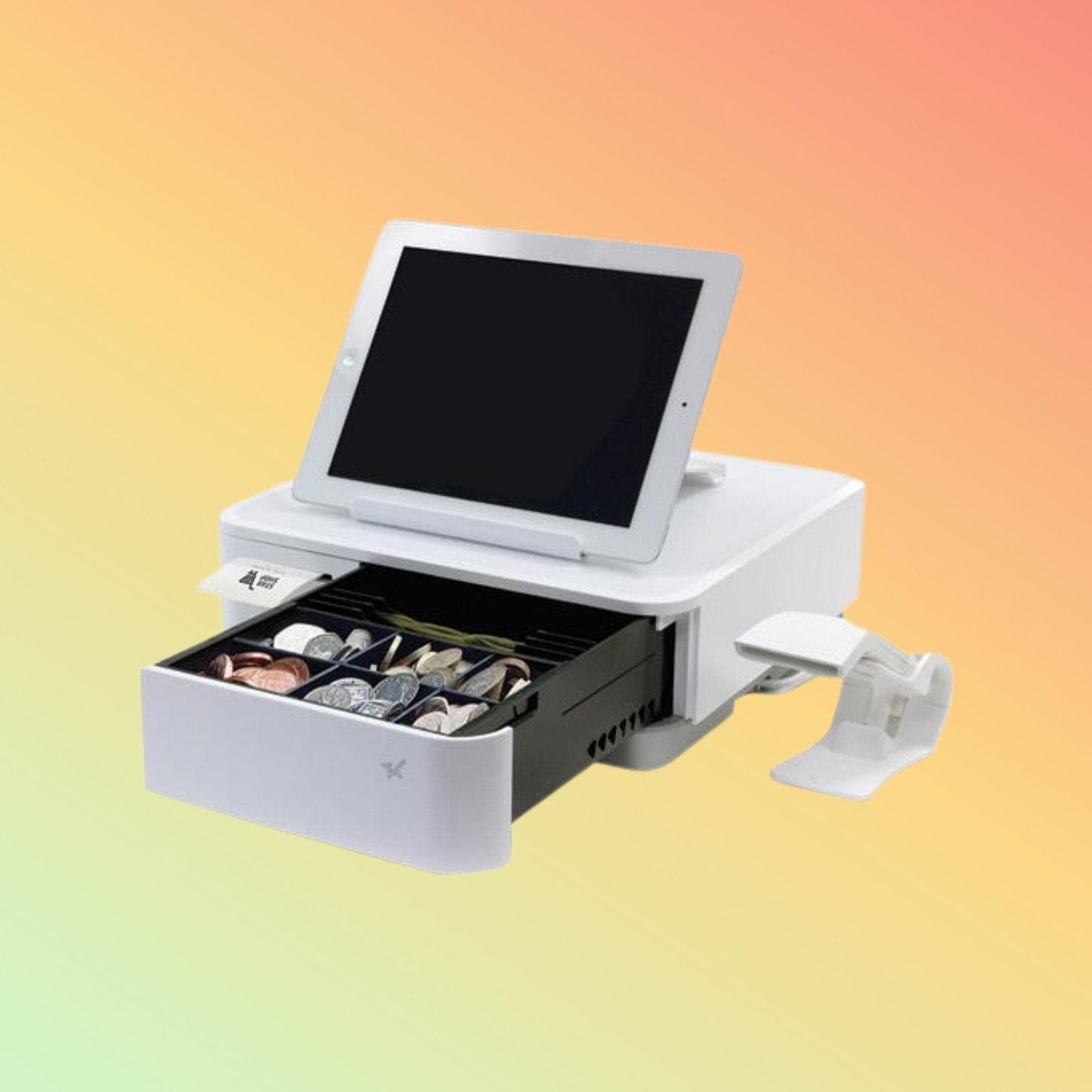
The Star mPOP is best understood not as a conventional POS terminal, but as a compact hardware foundation for building a tablet-based point-of-sale workstation.
Inside one enclosure, Star combines two physical components that normally occupy separate positions at a checkout:
58mm Receipt Printer + Cash Drawer
A compatible tablet or computer provides the POS interface and software, while optional peripherals such as a barcode scanner, customer display and payment terminal can be added according to the business requirement.
This makes the mPOP particularly relevant for businesses that want a compact checkout without automatically moving to a traditional touchscreen POS terminal with a separate printer and cash drawer.
Important: Is Star mPOP Really an All-in-One POS Terminal?
Not in the traditional sense.
The mPOP itself does not contain the complete computing platform normally associated with an all-in-one POS terminal.
It should therefore be understood as:
Integrated POS Hardware Peripheral
rather than:
Complete Standalone POS Computer
A working checkout normally requires:
Tablet / Compatible Host Device
POS Software
Star mPOP
The mPOP then provides the physical receipt-printing and cash-drawer functions.
This distinction is important when comparing it with Windows or Android POS terminals that contain their own processor, memory, storage, touchscreen and operating system.
What Problem Does the mPOP Solve?
Consider a traditional compact checkout:
Tablet
Tablet Charger
Receipt Printer
Printer Power Supply
Cash Drawer
Drawer Connection
Scanner
This can quickly create a crowded counter.
The Star mPOP takes a different approach by placing the receipt printer and cash drawer together in a low-profile enclosure and providing connectivity for a compatible POS environment.
The result can be a simpler physical workstation where the tablet remains the primary customer-service interface.
The mPOP Checkout Concept
A practical mPOP-based POS environment can be built in layers.
Core Checkout
Tablet or Compatible POS Device
↓
POS Application
↓
Star mPOP
↓
Receipt + Cash Handling
Add Product Identification
Barcode Scanner
Add Customer-Facing Information
Compatible Customer Display
Add Electronic Payment
Separate Compatible Payment Terminal / Payment Solution
Add Physical Installation
Tablet Stand / Counter Mount / Under-Counter Mount
This modular approach allows a business to select components according to its actual workflow.
Integrated 58mm Direct Thermal Printer
The mPOP contains a 58mm direct thermal receipt printer.
Direct thermal technology prints onto heat-sensitive receipt paper and therefore does not require:
- Ink cartridges
- Toner
- Thermal-transfer ribbons
The current documented mPOP platform provides:
Printing Method: Direct Thermal
Paper Width: 58 mm
Paper Roll Diameter: Up to 50 mm
Paper Thickness: 0.053–0.075 mm
Paper Loading: Drop-In
Paper Presentation: Front
Print Speed: Up to 100 mm/sec
Auto Cutter: Included
Current mPOPCBI configurations support full or partial cutting.
Why 58mm Matters
Receipt width should be considered before selecting the mPOP.
The mPOP is designed around 58mm receipt media, not 80mm receipt rolls.
58mm can be appropriate for compact transaction receipts where counter space and hardware size are priorities.
However, an 80mm printer may be preferable where the business requires:
- Wider receipt layouts
- More characters per line
- Larger logos
- Detailed hospitality receipts
- Kitchen printing
- Existing 80mm templates
- Larger paper-roll capacity
The mPOP should therefore not be selected simply because its integrated design is attractive.
The receipt format must also suit the business.
Integrated Compact Cash Drawer
Beneath the printer is the integrated cash drawer.
Current EMEA documentation specifies:
Banknote Storage: 4 Upright Note Holders
Coin Storage: Flexible 6 or 8 Coin Slots
Drawer Insert: Removable
Opening: Software Controlled with Emergency Release
The drawer is designed around a compact POS environment.
Businesses handling significant amounts of cash should compare its capacity with a conventional full-size cash drawer before selecting the mPOP.
Compact Physical Design
The mPOP measures approximately:
Width: 308 mm
Depth: 300 mm
Height: 100 mm
Its low-profile form allows a tablet and appropriate stand to be positioned around or above the unit while the receipt printer remains accessible from the front.
This arrangement can be useful where preserving counter workspace is important.
Choosing the Correct mPOP Connection
Not every mPOP configuration has the same interfaces.
This is one of the most important purchasing considerations.
mPOP10CBI
The newer mPOP10CBI configuration provides:
- Bluetooth 5.0
- USB-C
- USB-B
- 3 × USB-A ports
USB-C supports data communication and charging for supported iOS and Android AOA devices.
This configuration may suit businesses wanting both wired USB-C and Bluetooth flexibility.
mPOP10CI
The mPOP10CI configuration provides:
- USB-C
- USB-B
- USB-A
It does not provide the same Bluetooth configuration as the CBI model.
Customers should therefore select by exact model and manufacturer part number, not simply request "a Star mPOP."
USB-C Data and Charging
For a compatible tablet, the USB-C connection can simplify a stationary checkout.
Instead of treating charging and POS communication as entirely separate functions, a supported device can communicate with the mPOP while receiving power.
A possible configuration is:
Compatible Tablet
↕
USB-C Data + Charge
↕
mPOP
This can help create a cleaner fixed-counter installation.
However, having a USB-C connector does not mean every USB-C tablet will support the required communication and charging arrangement.
The exact device should be checked before purchase.
Bluetooth 5.0
The current mPOP10CBI provides Bluetooth 5.0.
Bluetooth can be useful when the compatible tablet needs to operate without a permanent communication cable between it and the mPOP.
A possible workflow is:
Tablet
↓
Bluetooth
↓
mPOP
↓
Receipt Printing + Cash Drawer
The selected POS application must support the required Star printing environment.
Bluetooth hardware alone does not guarantee application compatibility.
Which Operating Systems Can Form Part of an mPOP Setup?
Current mPOPCBI documentation identifies environments including:
- iOS
- Android
- Windows
- Linux
- macOS
This should not be interpreted as universal POS-software compatibility.
There are three separate questions:
Does the operating system support the hardware?
Does the POS application support the mPOP?
Does the required connection method work with that particular device?
All three should be checked.
The mPOP Is Not POS Software
The mPOP does not provide business-management functions by itself.
The selected POS application normally handles functions such as:
- Product database
- Sales transactions
- Pricing
- Tax configuration
- Inventory
- Staff access
- Receipt formatting
- Discounts
- Reports
- Customer information
This means customers should normally select or confirm their POS application before finalizing the hardware.
The mPOP Is Not a Card Payment Terminal
Another important distinction is payment processing.
The mPOP does not itself replace the merchant's payment terminal, payment provider or acquiring arrangement.
A complete checkout might therefore use:
Tablet + POS Software
↓
Star mPOP
for receipts and cash handling
and separately:
Payment Terminal / Payment Application
for card or other electronic payments.
Whether a payment system integrates with the POS software depends on the payment provider, application and country.
Add a Barcode Scanner When Needed
A barcode scanner can extend the mPOP workstation for product-based retail.
Possible uses include:
- Product scanning
- SKU identification
- Inventory lookup
- Membership codes
- Voucher scanning
Star offers compatible scanner options within the mPOP ecosystem.
The scanner should be selected according to the required barcode type.
A business scanning only conventional 1D retail barcodes may have different requirements from one scanning QR codes and other 2D symbols.
Add a Customer Display When Needed
A compatible Star SCD222 customer display can form part of the newer mPOP ecosystem.
A customer-facing display may be useful for showing information generated by supported POS software.
Whether this is necessary depends on the business.
A small appointment-based service business may not need one, while a retail checkout may find it useful.
Software support should be confirmed before adding the display.
Build the Physical Workstation
The mPOP ecosystem includes options for different physical installations.
These can include:
- Tablet holders
- Tablet stands
- Counter mounting
- Under-counter mounting
- Security mounting
The correct arrangement depends on:
- Tablet dimensions
- Operator position
- Customer interaction
- Available counter depth
- Cable routing
- Security
- Accessibility to receipt paper
- Cash drawer clearance
Hardware dimensions should therefore be considered as part of the counter design.
Black or White?
The current mPOP10CBI platform is available in both black and white configurations.
Star 39655990
mPOP10CBI Black
Star 39655890
mPOP10CBI White
These are useful exact-SKU choices where the customer already knows the required current CBI configuration and colour.
Colour is primarily an installation and design choice, while the exact part number ensures the intended hardware configuration is ordered.
Star mPOP Ecosystem
A complete mPOP environment can be assembled from several categories.
Core Hardware
Star mPOP Receipt Printer + Cash Drawer
Host Device
Compatible iPad, Android tablet, Windows device or other supported platform
Software
Compatible POS / mPOS application
Product Scanning
Compatible Star 1D or 2D barcode scanner
Customer-Facing Information
Compatible Star SCD222 customer display
Installation
Tablet stand or mounting solution
Receipt Consumable
Compatible 58mm direct thermal receipt paper
Electronic Payment
Separate compatible payment terminal or payment solution where required
Not every business requires every component.
Technical Specifications
Brand: Star Micronics
Product Family: mPOP
Product Category: Integrated Mobile POS Hardware
Primary Functions: Receipt Printing + Cash Storage
Printer Technology: Direct Thermal
Print Speed: Up to 100 mm/sec
Paper Width: 58 mm
Maximum Roll Diameter: 50 mm
Paper Thickness: 0.053–0.075 mm
Paper Loading: Drop-In
Paper Presentation: Front
Auto Cutter: Yes
Cash Drawer: Integrated
Banknote Sections: 4 Upright Holders
Coin Sections: Flexible 6 or 8 Slots on Current EMEA Configuration
Drawer Insert: Removable
Drawer Operation: Software Controlled
Current CBI Connectivity: Bluetooth 5.0, USB-C, USB-B, 3 × USB-A
Operating-System Environment: iOS, Android, Windows, Linux and macOS depending on model, connection and software
Power Supply: Internal
Dimensions: Approximately 308 × 300 × 100 mm
Colours: Black and White Configurations Available
Important Corrections to Older mPOP Information
Some older product descriptions online can create confusion because several mPOP generations exist.
For current purchasing decisions:
The printer uses 58mm paper.
It should not be described as supporting both 80mm and 58mm receipt rolls.
Current documented print speed is up to 100 mm/sec.
Older or incorrect 60 mm/sec descriptions should not be used for the current platform without identifying a specific model that supports that specification.
Ethernet should not be assumed.
Current mPOP10CBI documentation identifies Bluetooth and USB connectivity rather than standard Ethernet.
Cash drawer layout should be checked against the regional configuration.
Do not assume generic 4-bill / 4-coin descriptions apply to every mPOP configuration.
mPOP is not a complete standalone POS computer.
A compatible host device and POS application are normally required.
Things to Verify Before Building an mPOP POS System
Exact mPOP Model
Manufacturer Part Number
Black or White
Host Tablet / Device
Operating System
POS Software
USB-C or Bluetooth Requirement
USB-C Device Compatibility
58mm Receipt Layout
Expected Receipt Volume
Cash Drawer Capacity
1D or 2D Barcode Scanner Requirement
Customer Display Requirement
Tablet Stand
Mounting Position
Payment Terminal
Payment / POS Integration
Required Thermal Paper
Power Cable
Exact Package Contents
Current Availability and Lead Time
Who Should Consider an mPOP-Based POS Setup?
An mPOP configuration may be worth considering where the business:
- Wants a tablet-based checkout
- Requires cash handling
- Needs customer receipts
- Uses 58mm receipt paper
- Values compact counter hardware
- Wants printer and drawer integration
- Has compatible POS software
- Wants optional scanner or customer-display expansion
- Prefers a modular POS environment
Who May Need a Traditional POS Terminal Instead?
A conventional POS terminal may be more appropriate where:
- A built-in touchscreen computer is required
- Windows or Android computing hardware must be integrated into the terminal
- 80mm receipt printing is required
- A larger cash drawer is necessary
- High-volume receipt printing is expected
- Ethernet is mandatory
- Multiple integrated displays are required
- The existing POS software does not support mPOP
- The business wants one vendor-specific complete POS appliance rather than a modular tablet setup
The mPOP and a conventional all-in-one POS terminal solve different problems.
A Simple Way to Decide
Consider the mPOP if your requirement sounds like:
“We already have or want a tablet-based POS application and need a compact receipt printer and cash drawer around it.”
Consider a conventional POS terminal if your requirement sounds like:
“We need the touchscreen computer, operating system and POS hardware integrated into the main terminal.”
That distinction can prevent purchasing the wrong type of POS equipment.
FAQ - Star mPOP
Q: Is Star mPOP an all-in-one POS terminal?
A: It is an integrated POS hardware platform combining a receipt printer and cash drawer, but it is not a complete standalone POS computer. A compatible tablet or host device and POS software are normally required.
Q: Does mPOP include a receipt printer?
A: Yes. A 58mm direct thermal receipt printer is integrated into the unit.
Q: Does it include a cash drawer?
A: Yes. Cash storage is integrated into the same enclosure.
Q: Can mPOP print 80mm receipts?
A: No. The documented mPOP platform uses 58mm receipt media. Businesses requiring 80mm printing should consider another suitable receipt printer.
Q: How fast does the mPOP print?
A: Current Star documentation specifies up to 100 mm/sec.
Q: Does mPOP need ink or toner?
A: No. It uses direct thermal printing with compatible thermal receipt paper.
Q: Does the current mPOP support USB-C?
A: Current mPOP10CI and mPOP10CBI configurations provide USB-C functionality. The exact host device and compatibility should be verified.
Q: Which mPOP has Bluetooth 5.0?
A: The current mPOP10CBI configuration provides Bluetooth 5.0 alongside USB-C, USB-B and USB-A connectivity.
Q: Can a barcode scanner be added?
A: Yes, compatible Star scanner options are available. Select the scanner according to the required barcode types and confirm POS software support.
Q: Can I add a customer display?
A: Compatible customer-display options such as applicable Star SCD222 configurations can form part of the ecosystem, subject to software compatibility.
Q: Does mPOP process card payments?
A: The mPOP itself is not a payment terminal. Electronic payment normally requires a separate compatible payment solution.
Q: Which exact mPOP should I choose?
A: Start with your tablet, operating system, POS application, required connection method and colour. Then select the exact mPOP model and manufacturer part number that matches those requirements.
Related Products
Star 39655990 mPOP10CBI Black Receipt Printer & Cash Drawer
Star 39655890 mPOP10CBI White Receipt Printer & Cash Drawer
Star mPOP Combined Receipt Printer & Cash Drawer
Star SCD222 Customer Display
Star mPOP Barcode Scanners
Star mPOP Tablet Stands
Star mPOP Under-Counter Mounting Accessories
58mm Thermal Receipt Paper
Helpful Internal Links
NEOTECH® UAE
Why NEOTECH® UAE?
NEOTECH® approaches the mPOP differently from a simple product listing.
The important question is not only “What does the mPOP have?” but also “Does this architecture fit the way your business wants to operate?”
Before selecting an mPOP-based checkout, customers should understand the relationship between the tablet, POS software, receipt width, cash drawer, connectivity, scanner, customer display and payment system.
This helps distinguish between businesses that genuinely benefit from the compact mPOP architecture and those that would be better served by a conventional POS terminal and separate peripherals.
Learn First. Decide Second. Buy Only If It Is Right for Your Needs.
The NEOTECH® Learning Center is free and open to everyone. You do not need to be a NEOTECH® customer to access or benefit from our educational content. Learn at your own pace, explore the information freely, and make informed decisions based on your own needs. There is no obligation or pressure to purchase from NEOTECH®.
There is no obligation or pressure to purchase. Customers are encouraged to verify the exact mPOP model, manufacturer part number, tablet, operating system, POS software, receipt width, connectivity, cash-handling requirements and peripheral compatibility before ordering.
Delivery – UAE
NEOTECH® supports Star mPOP product requirements within the United Arab Emirates.
The exact mPOP model, colour, manufacturer part number, host-device requirements, accessories, quantity, availability and lead time should be confirmed before ordering.
Contact NEOTECH® UAE
Website: https://www.neotech.ae/
Email: support@neotech.ae
Address: Store 13, Computer Bldg, Al Fahidi, Bur Dubai, Dubai 44245, United Arab Emirates
Disclaimer - NEOTECH® UAE
Star, Star Micronics, mPOP and associated names are trademarks or product identifiers of their respective owners.
The Star mPOP family includes multiple generations and configurations. This page explains the mPOP POS hardware concept and ecosystem and should not be used as a substitute for the specification of an exact manufacturer part number.
Specifications, interfaces, included accessories and compatibility can vary by model, generation and region. Customers should verify the exact mPOP SKU, host device, operating system, POS application, receipt requirements and peripheral compatibility before ordering.
A tablet, POS software, payment terminal, barcode scanner, customer display and other optional equipment should not be assumed to be included unless specifically confirmed.
Last Updated: 02 September 2026 (GST, UTC+4)