Zebra
Zebra ET80 Rugged Tablet for Field, Vehicle & Industrial Work | NEOTECH® UAE
Zebra ET80 Rugged Tablet for Field, Vehicle & Industrial Work | NEOTECH® UAE
Couldn't load pickup availability
Enterprise 12-Inch Windows Rugged Tablet for Field Service, Manufacturing, Transportation, Utilities and Mobile Workforces - Built for Work Across the Field, Vehicle and Facility
Brand: Zebra Technologies
Model: ET80
Series: ET8x Series
Category: Rugged Windows Tablet
Primary Focus: Field & Industrial Applications
Display: 12-Inch QHD
Connectivity: WLAN / Wi-Fi
Form Factor: Tablet with Optional 2-in-1 Rugged Keyboard
Product Overview
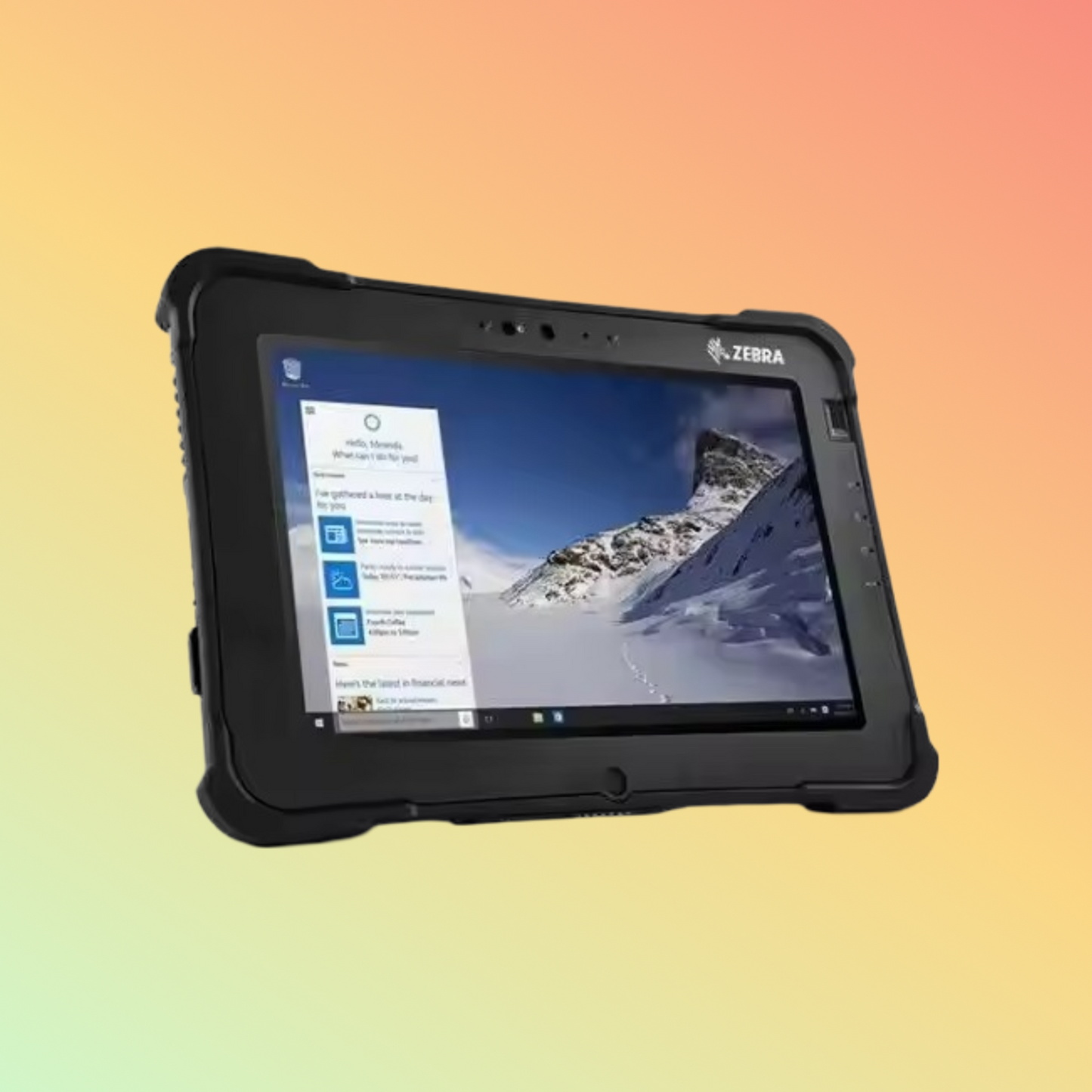
The Zebra ET80 is a rugged enterprise Windows tablet developed for mobile professionals who need their computer to move with them between the field, vehicle, facility and office.
Rather than focusing only on specifications, the ET80 addresses an important operational requirement: providing workers with one adaptable Windows computing platform that can function as a handheld tablet, a laptop-style device with the optional rugged keyboard, or part of a fixed or mobile workstation using Zebra docking accessories.
Zebra positions the ET80/ET85 platform for demanding roles including field service, manufacturing, transportation and logistics, warehousing and public-sector operations. Zebra Technologies
The ET80 is the WLAN-focused model within the ET8x family and supports Wi-Fi 6E. Organizations requiring integrated cellular WWAN should evaluate the appropriate Zebra ET85 configuration instead. Zebra Technologies
Built Around the Workday - Not Just the Desk
Many enterprise workers do not spend their entire shift at a conventional workstation.
A technician may begin in an office, travel in a service vehicle, inspect equipment outdoors, access technical information at the customer location and complete documentation before returning.
The Zebra ET80 is designed around this type of changing workflow.
Depending on the selected accessories, one ET80 can be used as:
- A standalone rugged tablet
- A touch-based field computer
- A laptop-style computer
- A vehicle-mounted workstation
- A desktop workstation
- A mobile data-capture terminal
This adaptability is one of the main reasons to consider the ET80 instead of treating it simply as another Windows tablet.
Field Service Applications
The ET80 can be considered for field-service teams that need access to Windows applications away from a traditional office.
Potential workflows include:
- Work-order management
- Equipment inspection
- Maintenance records
- Technical documentation
- Service manuals
- Customer records
- Inventory information
- Forms and reporting
- Photographic documentation
- Asset identification
- Barcode-based workflows
- Remote communication
Zebra specifically identifies access to technical specifications, inventory information and customer communication as important mobile capabilities for field technicians. Zebra Technologies
Utilities & Infrastructure
Utility and infrastructure personnel frequently work across vehicles, outdoor sites and facilities.
A rugged Windows tablet can support workflows such as:
- Field inspections
- Maintenance records
- Work orders
- Asset documentation
- Meter-related workflows
- Technical drawings
- Instructions and dashboards
- Field reporting
- Service documentation
Zebra's field-service guidance highlights mobile access to work orders, forms, instructions and operational information for technicians working away from the office. Zebra Technologies
Manufacturing
Manufacturing environments may require computing devices that move between production areas, equipment, offices and maintenance operations.
The ET80 can be considered for applications including:
- Production information
- Maintenance workflows
- Equipment inspection
- Quality processes
- Work instructions
- Inventory applications
- Manufacturing documentation
- Asset management
- Operational reporting
Zebra includes manufacturing among the principal industry applications for the ET80/ET85 rugged tablet platform. Zebra Technologies
Transportation & Logistics
Transportation and logistics operations often require mobile computing across warehouses, yards, vehicles and offices.
Possible ET80 workflows include:
- Vehicle-based computing
- Dispatch information
- Shipment documentation
- Inventory applications
- Proof-of-service workflows
- Warehouse operations
- Asset tracking
- Inspection
- Reporting
- Mobile Windows applications
Zebra's rugged-tablet portfolio positions ET80/ET85 for transportation and logistics, warehouse and field-mobility applications. Zebra Technologies
Public Sector & Emergency Operations
Zebra also positions rugged mobile technology for public-sector and emergency-response environments where personnel may need information and computing capability in vehicles, at facilities and in the field. Zebra Technologies
Potential workflows can include:
- Mobile reporting
- Incident documentation
- Vehicle-based computing
- Forms
- Operational information
- Evidence or condition photography
- Asset information
- Team communication
- Field-based Windows applications
The suitability of any ET80 configuration for a specific government, emergency-service or security application should be evaluated against that organization's technical, security and regulatory requirements.
From Tablet to Laptop
The ET80 can operate as a standalone tablet.
When physical keyboard input is required, Zebra offers an optional ET8x rugged keyboard.
The keyboard uses a friction hinge so users can adjust the viewing position and provides a laptop-style working configuration. Zebra also incorporates an extendable carrying handle into the keyboard design. Zebra Technologies
This can be useful when the same employee needs touch interaction while moving and conventional keyboard input when completing longer reports or documentation.
The keyboard is an optional accessory and should not be assumed to be included with every ET80.
From Field to Vehicle
Zebra offers an ET8x vehicle dock for in-vehicle installations.
This enables organizations to design workflows where the same tablet used outside the vehicle can become part of a vehicle workstation when the worker returns.
Applications may include:
- Service vehicles
- Utility vehicles
- Mobile maintenance
- Transportation operations
- Field-response vehicles
- Mobile workstations
The correct dock, mounting hardware, power arrangement and interfaces should be selected for the particular vehicle and application.
From Field to Office
Zebra also provides a desktop dock for office and industrial environments.
This allows the ET80 to transition from mobile use into a more conventional workstation arrangement.
For organizations trying to reduce the number of separate computing devices assigned to mobile employees, this field-to-office capability may be worth evaluating.
12-Inch QHD Display
The ET80 features a:
12-inch QHD display
with:
2160 × 1440 resolution
and a:
3:2 aspect ratio
The larger 3:2 workspace is useful for business applications, documents, forms and operational software.
Sunlight-Readable 800-Nit Display
The ET80 provides an:
800-nit
display designed for visibility across varied working environments.
The screen incorporates:
- Corning Gorilla Glass
- Anti-reflective treatment
- Anti-smudge treatment
- Capacitive multi-touch
Actual readability will depend on environmental and lighting conditions.
Finger, Glove & Wet Touch Operation
The capacitive touchscreen supports up to:
10 simultaneous touch points
and operating modes designed for:
- Finger input
- Glove use
- Wet conditions
The ET80 also supports compatible MPP 2.0 active pen input.
These capabilities can be particularly useful where workers cannot interact with the tablet under the controlled conditions of an office.
Rugged Construction
The ET80 is designed for demanding enterprise environments.
Key rugged characteristics include:
- IP65 sealing
- MIL-STD-810H testing
- Standard 4 ft / 1.2 m drop specification
- Up to 5 ft / 1.5 m drop specification with optional rugged boot
- Broad operating-temperature range
Rugged ratings apply according to Zebra's specified test conditions and should not be interpreted as protection against every possible accident, impact or environmental exposure.
Optional Rugged Boot
Zebra offers an optional ET8x Rugged Boot that increases the ET8x tablet drop specification to 5 ft / 1.5 m.
Zebra also designed the rugged boot for compatibility with the 2-in-1 keyboard, docks, expansion back and other ET8x accessories. Zebra Technologies
This may be useful for deployments where additional physical protection is appropriate.
Windows Enterprise Computing
The ET80 provides a familiar Windows environment for organizations whose workflows depend on Windows applications.
Current Zebra documentation identifies Windows 11 Professional 64-bit for the platform.
This makes the ET80 relevant where organizations need mobile access to existing Windows-based business applications rather than migrating the workflow to a different operating system.
Application compatibility should always be verified before quantity deployment.
Intel Core Processing
ET80 configurations are available with selected 11th Generation Intel Core i5 and Core i7 processors.
Documented processor configurations include:
- Intel Core i7-1180G7 vPro
- Intel Core i5-1140G7 vPro
- Intel Core i5-1130G7
The exact processor varies by Zebra part number.
Memory & SSD Options
Depending on configuration, the ET80 platform supports:
Memory
- 8GB LPDDR4x
- 16GB LPDDR4x
Removable PCIe SSD
- 128GB
- 256GB
- 512GB
The exact processor, RAM and storage combination should be verified from the required Zebra SKU before ordering.
Enterprise Wi-Fi
The ET80 is the WLAN-focused member of the ET8x family and supports Wi-Fi 6E capability with the appropriate supported environment.
This can support enterprise deployments requiring modern wireless connectivity across:
- Facilities
- Warehouses
- Plants
- Offices
- Operational sites
Network performance depends on the organization's wireless infrastructure, configuration, operating system and local regulatory conditions.
ET80 or ET85?
This distinction is important.
Choose ET80 When
The application primarily requires:
- Enterprise Wi-Fi
- Rugged Windows computing
- Field and facility mobility
- Vehicle or desktop docking
- No integrated cellular WWAN requirement
Evaluate ET85 When
The project requires applicable:
- 4G/5G cellular connectivity
- WWAN operation away from Wi-Fi
- Integrated GNSS/GPS functionality
Zebra's portfolio distinguishes the ET80 with Wi-Fi 6E from applicable ET85 Wi-Fi 6E and cellular configurations. Zebra Technologies
Data Capture
Selected ET80 configurations can incorporate Zebra's:
SE4107 2D barcode scan engine
This can support barcode-driven applications without requiring workers to carry a separate scanner for every workflow.
The integrated scanner is optional and must be verified from the exact Zebra part number.
Cameras for Field Documentation
The ET8x platform provides:
13MP autofocus rear camera
with LED flash and privacy shade.
A front Full HD Windows Hello camera supports compatible authentication and collaboration workflows.
Potential uses include:
- Equipment photographs
- Damage documentation
- Inspection records
- Service evidence
- Asset documentation
- Remote collaboration
NFC
Integrated NFC can support compatible identification and enterprise workflows.
The exact application, card technology and software compatibility should be confirmed before deployment.
Security Options
Depending on configuration, the ET80 platform provides or supports security capabilities including:
- TPM 2.0
- Windows Hello
- Optional fingerprint reader
- Optional CAC smart-card reader
- NFC/contactless smart-card functionality
- Kensington cable-lock support
Organizations with formal security requirements should specify those requirements before selecting the exact configuration.
Replaceable Battery
The ET80 uses a user-replaceable main battery.
Zebra specifies:
5180mAh / 39.8Wh
for the standard main battery.
Instead of relying on a universal fixed-hours battery claim, organizations should evaluate runtime according to their actual:
- Application workload
- Screen brightness
- Wireless usage
- Peripheral use
- Environmental conditions
Optional Hot-Swappable Secondary Battery
For extended workflows, Zebra offers an optional:
3400mAh / 25.8Wh secondary battery
with the appropriate expansion back.
The secondary battery is designed to support hot-swapping and can help organizations build longer-shift workflows with reduced charging interruption.
Zebra DNA for Tablets
The ET8x Series is supported by Zebra DNA for Tablets, Zebra's suite of enterprise tools intended to assist organizations with device setup, security, management and optimization throughout the device lifecycle. Zebra Technologies
Organizations should evaluate the specific Zebra software capabilities required for their deployment rather than assuming every software feature is automatically included or licensed.
Key Specifications
Brand: Zebra Technologies
Model: ET80
Series: ET8x
Device Type: Rugged Windows Tablet
Form Factor: Standalone Tablet / Optional 2-in-1
Display: 12 Inches
Resolution: 2160 × 1440 QHD
Aspect Ratio: 3:2
Brightness: 800 nits
Touch: 10-point capacitive multi-touch
Input Modes: Finger, glove and wet touch
Active Pen: MPP 2.0 compatible
Processor: Selected 11th Gen Intel Core i5/i7 configurations
Operating System: Windows 11 Professional 64-bit
Memory: 8GB or 16GB, configuration dependent
Storage: 128GB / 256GB / 512GB removable PCIe SSD, configuration dependent
WLAN: Wi-Fi 6E capability
NFC: Supported
WWAN: Review ET85 when integrated cellular connectivity is required
Rear Camera: 13MP autofocus
Front Camera: FHD Windows Hello camera
Barcode Scanner: Optional SE4107 2D imager
USB-C: USB 3.2 Gen 2 with Power Delivery and DisplayPort
USB Type-A: 2 × USB 3.2 Gen 2
Main Battery: 5180mAh / 39.8Wh, user replaceable
Secondary Battery: Optional hot-swappable battery with applicable expansion back
Protection: IP65
Rugged Testing: MIL-STD-810H
Standard Drop Specification: 1.2 m
With Optional Rugged Boot: Up to 1.5 m
Operating Temperature: Approximately -20°C to 60°C
Tablet Dimensions: Approximately 308 × 225 × 16 mm
Tablet Weight: Approximately 1.3 kg with standard battery
Typical Industry Applications
Field Service
- Work orders
- Maintenance
- Inspection
- Technical documentation
- Service reporting
- Asset information
Manufacturing
- Production information
- Quality workflows
- Maintenance
- Equipment inspection
- Work instructions
- Inventory
Transportation & Logistics
- Vehicle computing
- Dispatch
- Warehouse operations
- Shipment documentation
- Inspection
- Asset workflows
Utilities
- Field maintenance
- Infrastructure inspection
- Work orders
- Technical information
- Documentation
- Mobile reporting
Public Sector
- Mobile field operations
- Vehicle-based computing
- Reporting
- Operational information
- Incident documentation
- Asset management
Why a Rugged Tablet Instead of a Consumer Tablet?
The decision should be based on the deployment rather than simply choosing the most rugged device available.
The ET80 may make sense where the working environment requires a combination of:
- Windows enterprise applications
- Frequent mobile use
- Vehicle-to-field movement
- Dust and water resistance
- Drop resistance
- Replaceable battery
- Enterprise docking
- Long-term accessory support
- Optional integrated data capture
- Enterprise device-management capabilities
For ordinary indoor office use where these capabilities are unnecessary, a rugged ET80 may provide more functionality than the application requires.
Things to Verify Before Ordering
Please confirm:
- Exact Zebra ET80 part number
- Quantity
- Industry and application
- Required Windows applications
- Processor requirement
- RAM requirement
- SSD capacity
- Barcode scanning requirement
- Keyboard requirement
- Vehicle docking requirement
- Desktop docking requirement
- Rugged boot requirement
- Secondary battery requirement
- Fingerprint requirement
- CAC reader requirement
- Stylus requirement
- Wi-Fi environment
- Whether cellular connectivity is required
- Required accessories
- Current availability
- Applicable regional configuration
If integrated cellular or GNSS functionality is required, mention this before ordering so the appropriate ET85 configuration can be evaluated.
Who Should Consider the Zebra ET80?
The ET80 may be suitable for organizations whose employees move repeatedly between:
Field → Vehicle → Facility → Office
and still need access to enterprise Windows applications throughout that workflow.
It may be particularly relevant to:
- Field-service organizations
- Manufacturing operations
- Transportation companies
- Logistics operations
- Utility providers
- Industrial businesses
- Public-sector organizations
- Mobile maintenance teams
- System integrators
How to Use
- Define the operational workflow before selecting the ET80 configuration.
- Confirm whether WLAN-only ET80 connectivity is sufficient.
- Select the required processor, memory and storage configuration.
- Add the integrated scanner only when the workflow requires barcode capture.
- Select the rugged keyboard when regular typing or laptop-style operation is required.
- Select vehicle or desktop docking according to the work environment.
- Configure Windows according to company IT and security policies.
- Connect the device to the enterprise wireless network.
- Install and test the required business applications.
- Configure security, device management and data-capture functions.
- Test the complete configuration in the actual working environment before wider deployment.
Warranty
Subject to Zebra's applicable hardware warranty terms, Zebra states that the ET80/ET85 is warranted against defects in workmanship and materials for three years from the date of shipment. Zebra Technologies
Exact entitlement, exclusions, regional coverage and service options should be confirmed for the supplied serial number and configuration.
Why NEOTECH® UAE?
NEOTECH® focuses on the application first rather than recommending an enterprise tablet based only on its specifications.
- Exact Zebra ET80 configuration verification
- ET80 versus ET85 connectivity guidance
- Field and industrial application review
- Processor, memory and storage selection
- Barcode-scanner requirement checking
- Keyboard and docking guidance
- Vehicle-use requirement review
- Rugged accessory selection
- Compatibility guidance before purchase
- Transparent availability and lead-time communication
- UAE-focused quotation and delivery support
- No pressure to select rugged features the application does not require
Learn First. Decide Second.
Request a Quote or Order in the UAE
For an accurate Zebra ET80 quotation, please provide:
- Quantity
- Industry
- Intended application
- Exact Zebra part number, if known
- Required processor/RAM/storage
- Barcode scanner requirement
- Keyboard requirement
- Vehicle or desktop docking requirement
- Whether cellular connectivity is required
For price, availability or a formal quotation:
Email: support@neotech.ae
Learn First. Decide Second.
Delivery - UAE
Delivery is available within the United Arab Emirates.
Order Cut-Off: 14:00 GST
Handling: 1–2 business days where applicable
Standard Transit: Approximately 3–5 business days after handling
Typical Total Delivery: Approximately 4–7 business days for confirmed available products
For non-stock or special-order configurations, delivery may extend to approximately 10–15 working days or up to 25 working days after payment/order confirmation, depending on supplier/manufacturer availability.
Availability and lead time should be confirmed against the exact Zebra part number.
FAQ - Zebra ET80 for Field & Industrial Applications
Q: Is the Zebra ET80 designed for field work?
A: Yes. Zebra positions the ET80/ET85 rugged platform for workers who operate across the field, vehicles and facilities, including field-service and other demanding enterprise environments.
Q: Is the ET80 suitable for manufacturing?
A: Zebra includes manufacturing among the industry applications for the ET80/ET85 platform. Suitability should still be assessed against the specific software, environmental and peripheral requirements.
Q: Can the Zebra ET80 be installed in a vehicle?
A: Yes. Zebra offers an ET8x vehicle dock designed for in-vehicle installations.
Q: Can the same ET80 be used in an office?
A: Yes. The tablet can be used independently, with the optional rugged keyboard, or with Zebra's desktop docking solution depending on the required workflow.
Q: Can the ET80 replace a laptop?
A: For compatible workflows, the optional ET8x rugged keyboard converts the tablet into a laptop-style 2-in-1 configuration. Whether it can replace a particular laptop depends on the applications, interfaces and performance requirements.
Q: What size is the Zebra ET80 display?
A: It has a 12-inch QHD 2160 × 1440 display.
Q: Can the screen be operated while wearing gloves?
A: Yes. Zebra specifies finger, glove and wet touch modes.
Q: Is the Zebra ET80 waterproof?
A: Zebra specifies IP65 sealing under its defined test conditions. IP65 should not be interpreted as permission for unrestricted immersion or exposure outside the manufacturer's specifications.
Q: How far can the ET80 be dropped?
A: Zebra specifies a standard 4 ft / 1.2 m drop rating under its test conditions. The optional rugged boot increases the specified drop height to 5 ft / 1.5 m.
Q: Does the ET80 have Wi-Fi 6E?
A: Yes, with an appropriate supported operating system and compatible network infrastructure.
Q: Does the ET80 include cellular connectivity?
A: ET80 is the WLAN-focused model. If integrated cellular connectivity is required, an applicable ET85 configuration should be evaluated.
Q: Can the ET80 scan barcodes?
A: Selected configurations can include Zebra's optional SE4107 2D scan engine. Verify the exact part number before ordering.
Q: Is the rugged keyboard included?
A: Not automatically. It is an optional accessory/configuration unless specifically included in the quotation.
Q: Can the battery be replaced during the product's service life?
A: Yes. Zebra specifies a user-replaceable main battery. An optional secondary hot-swappable battery is also available with the appropriate expansion back.
Q: Is ET80 suitable for ordinary office use?
A: It can be used in an office, but organizations that do not require rugged construction, docking flexibility or mobile enterprise features should first determine whether a simpler computer would better match the requirement.
Q: What should we provide for a project quotation?
A: Provide the quantity, industry, intended workflow, exact Zebra part number if available, processor/RAM/storage requirement, scanner requirement, keyboard and docking needs, and whether cellular connectivity is required.
Related Products
- Zebra ET85 Rugged 2-in-1 Tablet
- Zebra ET8x Rugged Keyboard
- Zebra ET8x Rugged Boot
- Zebra ET8x Vehicle Dock
- Zebra ET8x Desktop Dock
- Zebra ET8x Expansion Back
- Zebra Rugged Windows Tablets
Helpful Internal Links
- Zebra Rugged Tablets UAE
- Rugged Windows Tablets UAE
- Field Service Technology UAE
- Industrial Tablets UAE
- Manufacturing Mobility Solutions UAE
- Transportation & Logistics Technology UAE
- Enterprise Mobility Solutions UAE
Contact - NEOTECH® UAE
For Zebra ET80 application guidance, configuration checking or quotation:
Email: support@neotech.ae
Address: Store 13, Computer Building, Al Fahidi, Bur Dubai, Dubai 44245, UAE
Disclaimer - NEOTECH® UAE
This page focuses on Zebra ET80 field, vehicle and industrial applications.
ET80 specifications and features vary according to the exact Zebra part number. Processor, memory, storage, integrated scanner, security features, keyboard, docks and other accessories should not be assumed to be included unless specifically identified.
The ET80 is the WLAN-focused ET8x model. Projects requiring integrated cellular WWAN or GNSS should evaluate the appropriate Zebra ET85 configuration.
Industry examples describe potential applications and do not guarantee compatibility with a particular organization's software, vehicle, security policy, operating environment or workflow.
Customers should verify the exact Zebra part number, application compatibility, accessories, regional configuration, availability, lead time and applicable warranty before ordering.
Last Updated: 1 October 2026 (GST, UTC+4)