Zebra
Zebra ZT411 Industrial Barcode Label Printer 300 dpi | NEOTECH® UAE
Zebra ZT411 Industrial Barcode Label Printer 300 dpi | NEOTECH® UAE
Couldn't load pickup availability
High-Resolution 4-Inch Industrial Barcode Printing for Warehousing, Manufacturing, Logistics and Product Identification.
Professional Highlights
- Industrial 4-inch barcode label printer with 300 dpi resolution
- High-resolution printing for small text, detailed graphics and dense barcodes
- Maximum print speed of 254mm/s (10 inches per second) at 300 dpi
- Maximum print width of 104mm (4.09 inches)
- Supports thermal transfer and direct thermal printing
- 4.3-inch colour touchscreen for configuration and status information
- Metal frame construction for industrial environments
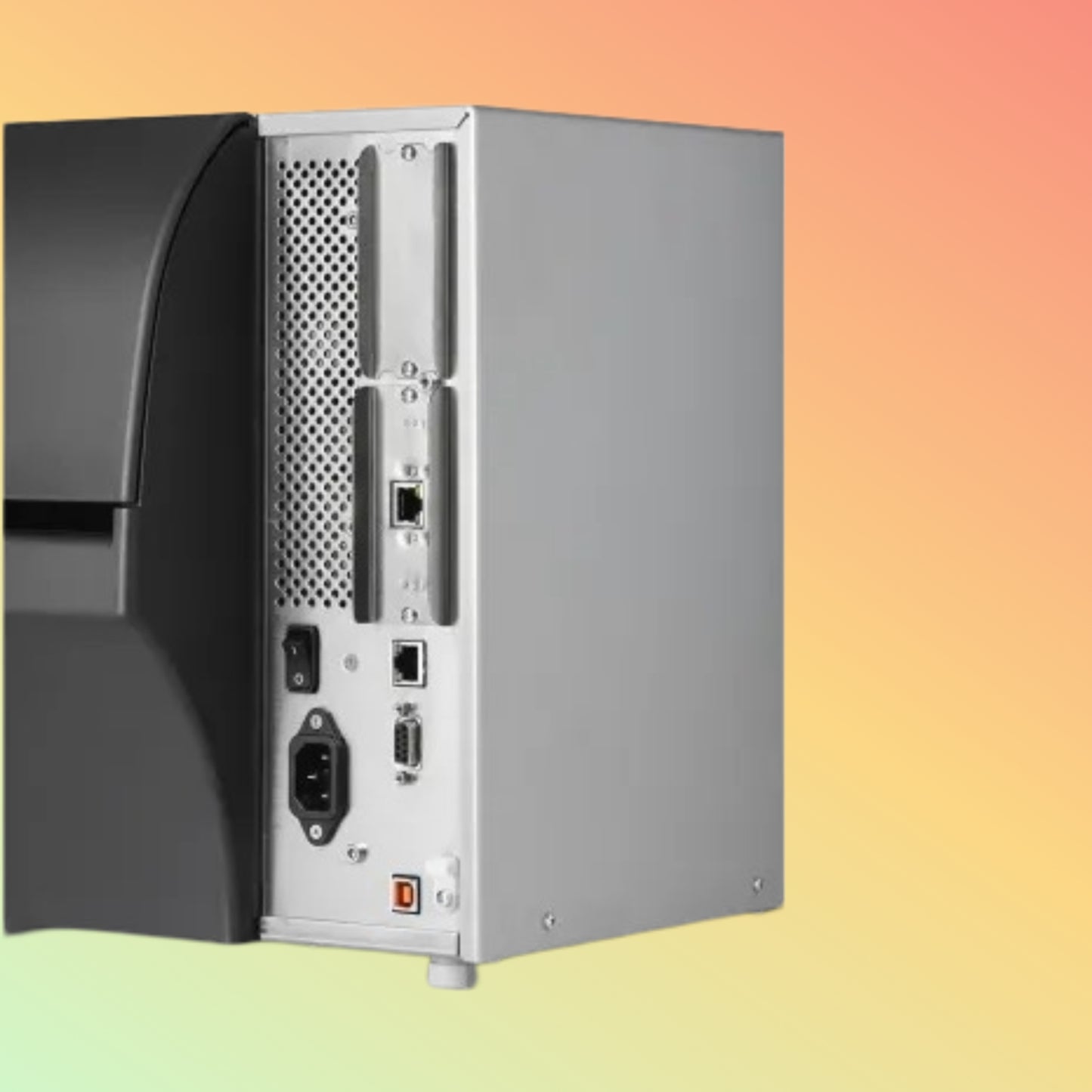
- USB 2.0, RS-232 serial and Ethernet connectivity
- Bluetooth 4.1 on documented standard configurations
- Dual USB Host ports
- Adjustable transmissive and reflective media sensors
- 256MB SDRAM and 512MB onboard Flash memory
- Supports compatible roll-fed and fanfold label media
- Optional cutter, peeler, liner take-up and rewind configurations
- Optional wireless connectivity and RFID capabilities on selected configurations
- Suitable for warehouse, manufacturing, shipping and inventory applications
- Exact manufacturer part number and installed options must be confirmed before ordering
Product Overview
The Zebra ZT411 Industrial Barcode Label Printer 300 dpi is a 4-inch industrial thermal printer designed for businesses requiring detailed barcode labels, dependable media handling and integration with operational printing systems.
Part of Zebra's ZT400 Series, the ZT411 supports both thermal transfer and direct thermal printing, providing flexibility for different label materials and durability requirements.
The 300 dpi configuration is particularly relevant when labels contain small text, high-density barcodes, detailed graphics or information that must fit within limited label space.
With a metal frame, side-loading media design, colour touchscreen and multiple communication interfaces, the ZT411 can be evaluated for industrial label-printing applications across the UAE.
This page focuses specifically on the 300 dpi configuration. The ZT411 family also includes 203 dpi and 600 dpi models with different performance characteristics.
Product Description
The Zebra ZT411 combines industrial construction with configurable printing, communication and media-handling capabilities.
Its 300 dpi printhead provides finer detail than the 203 dpi configuration, making it useful for compact product labels, asset identification and applications requiring smaller barcode elements.
At 300 dpi, Zebra specifies a maximum print speed of 10 inches per second (254mm/s).
The printer supports compatible direct thermal media for ribbon-free printing and thermal transfer media for applications requiring an appropriate ribbon and label combination.
A 4.3-inch colour touchscreen provides access to printer settings and operational information.
The ZT411 also supports optional features, including selected wireless interfaces, cutters, peelers, rewind mechanisms and RFID configurations.
These optional features must not be assumed to be installed on every printer.
Facts & Manufacturer Identification
Brand: Zebra Technologies
Manufacturer: Zebra Technologies Corporation
Product Family: ZT400 Series
Model: ZT411
Product Type: Industrial Barcode Label Printer
Resolution Covered by This Page: 300 dpi / 12 dots per mm
Print Width Class: 4-inch
Printing Methods: Thermal Transfer and Direct Thermal
Exact Manufacturer Part Number: To be confirmed before quotation
Product Configuration: Depends on manufacturer SKU and installed options
RFID: Optional; not standard on every ZT411
Wireless LAN: Optional on applicable configurations
Availability: Subject to supplier confirmation
Warranty: Subject to exact model, supplier and written quotation
Technical Specifications
Print Technology & Performance
Print Method: Thermal Transfer / Direct Thermal
Resolution: 300 dpi (12 dots/mm)
Maximum Print Width: 104mm (4.09 inches)
Maximum Print Speed at 300 dpi: 254mm/s (10 ips)
Programmable Print Speed: Approximately 61–254mm/s, in supported increments
Maximum Continuous Print Length at 300 dpi: Approximately 1,854–1,857mm, depending on manufacturer specification reference
Printhead Technology: Thermal printhead with Zebra E3 Element Energy Equalizer technology
Media Sensors: Adjustable transmissive and reflective sensors
Printer Languages: Zebra ZPL and EPL support as documented for the platform
Memory & Display
SDRAM: 256MB
Onboard Flash: 512MB
Display: 4.3-inch colour touchscreen
Status Indicators: Printer status LEDs
Configuration: On-device interface and supported Zebra management tools
Standard Communication
USB: USB 2.0
Serial: RS-232
Ethernet: 10/100
Bluetooth: Bluetooth 4.1 on documented standard configurations
USB Host: Dual USB Host
Wireless LAN: Optional, depending on exact configuration
Additional Interfaces: Subject to installed communication options
Media Specifications
Supported Media: Continuous, die-cut, notched and black-mark media
Media Width, Tear/Cutter: 25.4–114mm
Media Width, Peel/Rewind: 25.4–108mm
Maximum Media Roll Diameter: 203mm
Standard Media Core Diameter: 76mm
Media Thickness: 0.058–0.25mm
Minimum Label Length, Tear-Off: 12.7mm
Minimum Label Length, Peel: 12.7mm
Minimum Label Length, Rewind: 12.7mm
Minimum Label Length, Cutter: 25.4mm
Fanfold Media: Supported with appropriate loading arrangement
Linerless Media: Available only on supported linerless configurations or upgrades
Physical Specifications
Dimensions: Approximately 495 × 269 × 324mm (L × W × H)
Weight: Approximately 16.33kg for the base printer
Construction: Metal frame
Media Access: Side-loading design
Installation: Industrial workstation or suitable printer location
Dimensions and weight may vary when optional media-handling accessories are installed.
300 dpi Printing – Why It Matters
The ZT411 300 dpi configuration provides higher print resolution than the standard 203 dpi model.
This may be beneficial for:
- Small product identification labels
- Dense 1D and 2D barcodes
- Fine text and serial numbers
- Compact asset tags
- Electronics and component labels
- Detailed packaging labels
- Labels containing multiple data fields
- Applications with limited printable space
Higher resolution does not automatically guarantee better barcode readability.
Print quality also depends on label material, ribbon selection, barcode dimensions, printer settings and the scanning equipment used.
ZT411 203 dpi vs 300 dpi vs 600 dpi
The Zebra ZT411 family includes three principal printhead resolution options.
ZT411 203 dpi
Resolution: 203 dpi / 8 dots per mm
Maximum Print Speed: 356mm/s (14 ips)
Typical Applications: Shipping labels, warehouse labels, carton identification and general barcode printing
ZT411 300 dpi
Resolution: 300 dpi / 12 dots per mm
Maximum Print Speed: 254mm/s (10 ips)
Typical Applications: Small text, dense barcodes, product identification and detailed industrial labels
ZT411 600 dpi
Resolution: 600 dpi / 24 dots per mm
Maximum Print Speed: 102mm/s (4 ips)
Typical Applications: Very small labels, fine print and specialised high-resolution identification
The correct resolution depends on the label design, barcode specification, printing speed and operational requirements.
A printer supplied with one resolution should not be assumed to provide the other resolutions without appropriate hardware and configuration changes.
Direct Thermal vs Thermal Transfer
Direct Thermal Printing
Direct thermal printing uses compatible heat-sensitive labels without a ribbon.
It may be suitable for:
- Shipping labels
- Short-term warehouse labels
- Dispatch identification
- Temporary stock labels
- Logistics workflows
Direct thermal print durability depends on media quality and exposure to heat, light and other environmental conditions.
Thermal Transfer Printing
Thermal transfer printing uses a compatible ribbon together with appropriate label material.
It may be suitable for:
- Product identification
- Asset labels
- Industrial inventory labels
- Long-term tracking
- Durable packaging labels
- Applications requiring greater environmental resistance
Ribbon and label material must be selected according to the required durability and printing conditions.
Barcode & Label Applications
The ZT411 can support industrial barcode workflows using compatible printer commands, software and media.
Typical applications include:
- Code 128 product labels
- GS1 barcode labels
- QR Code labels
- Data Matrix identification
- Serial number labels
- Asset identification tags
- Warehouse location labels
- Shipping and receiving labels
- Manufacturing work-in-process labels
- Packaging identification
Actual barcode formatting and readability depend on the application, print configuration and label design.
Connectivity & System Integration
The ZT411 can be integrated into compatible barcode printing environments through its documented communication interfaces.
Potential host environments include:
- Warehouse management systems
- Inventory management software
- Manufacturing applications
- Shipping and dispatch software
- ERP-based label printing
- Windows-based label design applications
- Supported Zebra printer management tools
System integration should be verified according to the exact printer SKU, firmware, driver, printer language and host software.
A communication interface being present does not guarantee compatibility with every application.
Optional Features & Accessories
Depending on the exact manufacturer configuration, the ZT411 platform supports optional features such as:
- Wireless communication modules
- Label peel mechanisms
- Liner take-up
- Full rewind
- Guillotine cutter
- Compatible RFID reader/encoder
- Additional communication interfaces
- Alternative media-handling accessories
- Supported linerless printing configurations
Some options are factory-installed, while others may be field-installable.
Not all options can be installed together. Cutter, peel and rewind compatibility must be checked before ordering.
RFID capability is not included unless the exact printer configuration specifies it.
Applications
Warehousing & Inventory
- Inventory identification
- Storage-location labels
- Stock movement tracking
- Bin and shelf labels
- Warehouse receiving labels
Logistics & Distribution
- Shipping labels
- Carton identification
- Dispatch labels
- Distribution tracking
- Parcel identification
Manufacturing & Production
- Product identification
- Component labels
- Work-in-process tracking
- Production batch labels
- Packaging labels
Retail & Commercial Operations
- Product barcode labels
- Stock identification
- Asset tags
- Distribution-centre labels
- Internal logistics labels
Healthcare & Specialised Identification
- Equipment identification
- Supply-chain labels
- Asset tracking
- Compatible inventory and packaging applications
Any regulated healthcare or compliance-related label requirements must be independently verified.
Media & Ribbon Compatibility
Before purchasing labels or ribbons for the ZT411 300 dpi, confirm:
- Label width and length
- Label core diameter
- Maximum roll diameter
- Label material
- Direct thermal or thermal transfer requirement
- Ribbon width and length
- Ribbon ink orientation
- Gap, notch or black-mark sensing
- Printhead resolution
- Required barcode quality
- Environmental durability requirements
Using incompatible labels or ribbons may affect print quality, media feeding and printhead performance.
Buyer Guidance – Is the ZT411 300 dpi Right for You?
The Zebra ZT411 300 dpi may be suitable for businesses requiring detailed barcode labels and industrial media handling.
It is particularly relevant when the label contains small text, compact barcodes or fine graphical elements.
However, 300 dpi is not necessary for every application.
For standard shipping and warehouse labels, a 203 dpi printer may provide adequate quality with a higher maximum printing speed.
For very fine print or extremely small labels, a 600 dpi configuration may be worth evaluating.
The appropriate printer should be selected according to actual label samples, barcode requirements, media dimensions, printing volume and software compatibility.
Things to Verify Before Ordering
- Exact Zebra manufacturer part number
- 300 dpi printhead configuration
- Thermal transfer and direct thermal requirements
- Maximum required label width
- Label and ribbon specifications
- Required printing speed
- USB, serial and Ethernet requirements
- Bluetooth or optional Wi-Fi requirements
- Cutter, peeler or rewind options
- RFID requirement, if applicable
- Printer language and software compatibility
- Regional power cable
- Included accessories
- Product condition
- Required quantity
- Price and VAT
- Current availability
- Delivery lead time
- Warranty and return conditions
Do not make payment until the exact configuration and material commercial terms are confirmed in writing.
How to Use
- Confirm the exact printer model, resolution and installed options.
- Position the printer in a suitable operating environment.
- Connect the power supply and required communication interface.
- Load compatible labels using the side-loading media path.
- Install a compatible ribbon when using thermal transfer printing.
- Configure the selected printing method.
- Set the correct media sensing and label dimensions.
- Calibrate the printer where required.
- Install or configure the appropriate driver or label software.
- Print a test label and verify barcode readability.
- Adjust print darkness and speed according to the media and ribbon.
- Follow Zebra's maintenance and cleaning instructions.
The exact setup procedure depends on the printer configuration and operating environment.
Delivery & Returns – UAE
NEOTECH® UAE supports enquiries and quotations for Zebra industrial barcode printers within the United Arab Emirates.
The exact ZT411 manufacturer part number, resolution, installed options and current availability must be confirmed before order acceptance.
For confirmed available stock, estimated delivery is generally 2–3 working days after order and payment confirmation.
For items sourced from the UAE local market, estimated delivery is generally 5–7 working days, subject to supplier availability.
Imported or special-order products may require longer lead times, which will be confirmed in the quotation.
Warranty, cancellation, return and special-order conditions depend on the exact product and written commercial agreement.
No stock or delivery commitment is implied by this product-information page.
Why NEOTECH® UAE?
At NEOTECH®, product information is not treated as something we publish once and forget. We improve it whenever we discover a clearer, safer, or more useful way to serve the customer.
We believe industrial barcode printers should be selected according to verified technical specifications, media compatibility, software requirements and the intended application.
For the Zebra ZT411, choosing the correct resolution and manufacturer configuration is more important than relying on a general product-family description.
Our objective is to provide clear product information, transparent quotations and practical buyer guidance without unsupported promises.
There is no obligation or pressure to purchase from NEOTECH®.
Learn First. Decide Second.
Contact – NEOTECH® UAE
Email: support@neotech.ae
Location: Store 13, Computer Building, Al Fahidi, Bur Dubai, Dubai, United Arab Emirates
Product Reference: Zebra ZT411 Industrial Barcode Printer 300 dpi
For a quotation or compatibility enquiry, please provide the exact manufacturer part number, required quantity, label dimensions, ribbon requirements and delivery location.
FAQ – Zebra ZT411 Industrial Barcode Printer 300 dpi
Q: What is the Zebra ZT411 300 dpi printer?
A: It is a 4-inch industrial barcode label printer configured with a 300 dpi printhead for detailed thermal label printing.
Q: What is the maximum print speed at 300 dpi?
A: Zebra specifies a maximum of 254mm/s (10 inches per second) for the ZT411 300 dpi configuration.
Q: Does the ZT411 300 dpi print at 14 inches per second?
A: No. The 14 ips maximum applies to the 203 dpi configuration, not the 300 dpi model.
Q: What is the maximum print width?
A: The ZT411 supports a maximum print width of 104mm (4.09 inches).
Q: Does the printer support thermal transfer printing?
A: Yes. The ZT411 supports thermal transfer printing using compatible ribbon and labels.
Q: Does it support direct thermal printing?
A: Yes. It can print on compatible direct thermal media without a ribbon.
Q: Does the ZT411 have a touchscreen?
A: Yes. The documented platform includes a 4.3-inch colour touchscreen.
Q: Does it support USB connectivity?
A: Yes. USB 2.0 is included among the documented standard interfaces.
Q: Does it support Ethernet?
A: Yes. The documented standard configuration includes 10/100 Ethernet.
Q: Does the ZT411 have Bluetooth?
A: Zebra documents Bluetooth 4.1 on standard configurations. Other Bluetooth versions may be available with selected wireless options.
Q: Does every ZT411 include Wi-Fi?
A: No. Wireless LAN capability depends on the exact manufacturer configuration.
Q: Does every ZT411 include RFID?
A: No. RFID functionality is available on selected configurations and should not be assumed.
Q: Can the ZT411 print QR Codes?
A: Yes. Compatible Zebra printer commands and label software can generate QR Code labels.
Q: Can it print Data Matrix barcodes?
A: Yes. Data Matrix printing is supported through compatible barcode commands and software.
Q: Is 300 dpi better than 203 dpi?
A: It provides finer print detail, but the better choice depends on barcode size, label design, printing speed and application requirements.
Q: Is the ZT411 suitable for warehouse labels?
A: Yes. It is designed for industrial applications including warehouse identification, shipping and inventory labels.
Q: Can the ZT411 print asset labels?
A: Yes. It can be used for compatible asset identification labels with appropriate media and software.
Q: Can it use synthetic labels?
A: Compatible synthetic label materials may be used, subject to appropriate ribbon and media selection.
Q: Does the ZT411 support a cutter?
A: A cutter is available as an optional configuration or accessory. It is not included with every printer.
Q: Does the ZT411 support label peeling?
A: Yes. Optional peel configurations are available, subject to exact model and accessory compatibility.
Q: Can I upgrade from 203 dpi to 300 dpi?
A: Do not assume a printhead-only replacement is sufficient. Any resolution conversion must follow Zebra's approved hardware and configuration requirements.
Q: Is the Zebra ZT411 300 dpi available in UAE?
A: Availability depends on the exact manufacturer part number and supplier confirmation.
Q: What warranty applies?
A: Warranty depends on the exact product, supplier and written quotation.
Q: What should I confirm before purchasing?
A: Verify the exact manufacturer part number, 300 dpi resolution, connectivity, media requirements, optional features, software compatibility, price, VAT, delivery and warranty.
Disclaimer – NEOTECH® UAE
Zebra, Zebra Technologies, ZT411, ZT400 and associated product names are trademarks or product identifiers of their respective owners.
This page focuses on the Zebra ZT411 300 dpi industrial printer configuration. Specifications and features may differ across 203 dpi, 300 dpi, 600 dpi, RFID and optional media-handling variants.
The maximum print speed for the 300 dpi configuration is 10 ips, not the 14 ips maximum associated with 203 dpi.
Optional Wi-Fi, RFID, cutter, peeler, rewind and other accessories are not included unless expressly confirmed for the quoted manufacturer part number.
Customers should verify the exact printer configuration, media compatibility, software requirements, price, VAT, availability, delivery, warranty, returns and official payment beneficiary details before making payment.
NEOTECH® UAE does not claim manufacturer authorisation or guaranteed compatibility without supporting written evidence.
Last Updated: 9 October 2026 (GST, UTC+4)