Zebra
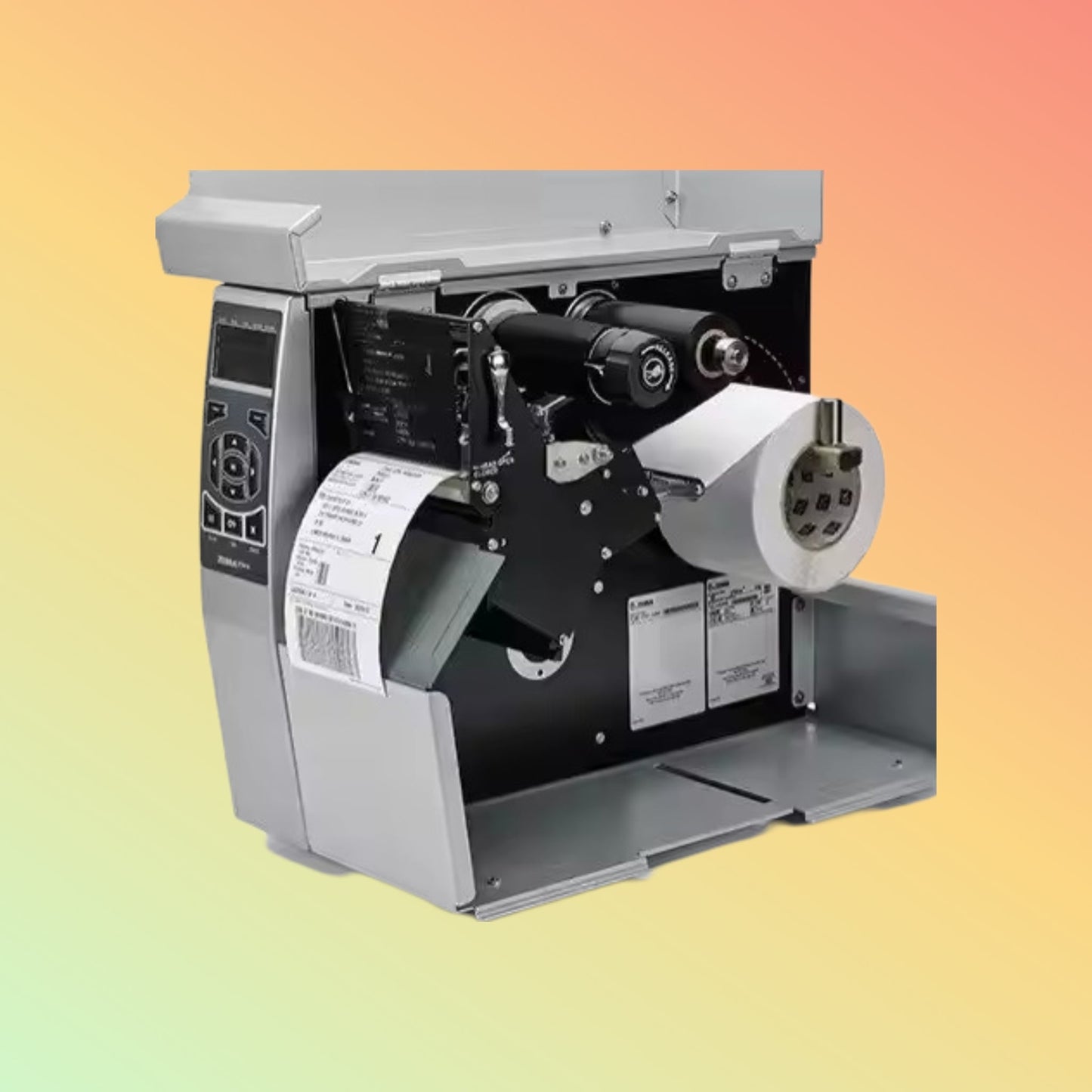
Zebra ZT510 Industrial Label Printer 203 dpi | NEOTECH® UAE
Zebra ZT510 Industrial Label Printer 203 dpi | NEOTECH® UAE
Couldn't load pickup availability
Industrial label printing built on the proven 105SLPlus platform.
Zebra ZT510 203 dpi Industrial Label Printer The Zebra ZT510 is a 4-inch industrial label printer designed for organisations that require dependable thermal printing in manufacturing, warehousing, distribution and logistics environments. It builds on the 105SLPlus platform while adding updated management, monitoring and connectivity capabilities.
The 203 dpi version is suited to general-purpose barcode labels, shipping labels, asset labels, pallet labels and other applications where standard-resolution text and barcode printing is appropriate.
Overview
The Zebra ZT510 supports both thermal-transfer and direct-thermal printing. Its industrial construction is intended for demanding operating environments where printers may be used for extended production cycles.
Zebra describes the ZT510 as the successor to the 105SLPlus. However, replacing an existing 105SLPlus should not be treated as a direct plug-and-play change without verification. Printer language, communication ports, print width, media dimensions, installed options and software integration should be reviewed before purchase.
Key Features
203 dpi print resolution
The 203 dpi printhead is designed for standard industrial barcode, text and graphics applications. It is normally suitable where very small text, compact two-dimensional codes or unusually fine graphics are not required.
Thermal-transfer and direct-thermal printing
The printer can use:
- Direct-thermal labels for applications that do not require a ribbon
- Thermal-transfer labels with a compatible ribbon for longer-lasting print durability
Industrial construction
The ZT510 uses a durable industrial design intended for production, warehouse and logistics environments.
High-speed printing
The 203 dpi configuration supports print speeds of up to 12 inches per second, subject to media, ribbon, darkness, label design and application settings.
Multiple communication options
Depending on the exact configuration and installed options, connectivity may include:
- USB
- Serial
- Gigabit Ethernet
- Bluetooth
- Optional wireless connectivity
The exact interfaces must be confirmed from the full part number before ordering.
Printer management and monitoring
The ZT510 includes updated management and monitoring capabilities compared with the earlier 105SLPlus platform.
Technical Specifications
Printer type: Industrial barcode and label printer
Print method: Thermal transfer and direct thermal
Print resolution: 203 dpi / 8 dots per mm
Maximum print speed: Up to 12 inches per second
Maximum print width: Approximately 104 mm / 4.09 inches
Print language: Zebra printer languages and supported emulations depend on configuration and firmware
Standard connectivity: Configuration dependent; may include USB, serial and Ethernet
Wireless connectivity: Available on selected configurations or through optional interfaces
Media handling: Roll-fed and fanfold media support, subject to media specifications
Ribbon use: Required for thermal-transfer printing
Construction: Industrial metal-frame design
Display and controls: Front control panel for printer status and configuration
Power requirements: Confirm according to the destination configuration and supplied power cord
Supported resolution options: ZT510 configurations are available in 203 dpi and 300 dpi; this page refers specifically to the 203 dpi version.
Applications
The Zebra ZT510 may be considered for:
- Shipping and dispatch labels
- Warehouse location labels
- Pallet and carton labels
- Manufacturing work-in-progress labels
- Product identification labels
- Inventory and asset labels
- Compliance labels
- Distribution and logistics labels
- Retail back-office labelling
- Transportation documentation
Purpose of Use
This printer is intended for organisations that require repeated label production in industrial or operational environments.
The 203 dpi model is generally appropriate for standard barcode and text applications. Buyers working with very small labels, high-density barcodes, fine graphics or small fonts should compare the 203 dpi and 300 dpi versions before deciding.
Compatibility
The ZT510 can be used with many Windows-based systems, label-design applications, enterprise resource planning systems, warehouse-management systems and middleware platforms.
Actual compatibility depends on:
- Printer driver availability
- Printer language
- Host operating system
- Software integration
- Network configuration
- Label format
- Existing application commands
- Installed printer options
Zebra provides drivers, utilities, documentation and support resources for the ZT510 through its support platform.
Migrating from the Zebra 105SLPlus
The ZT510 is positioned by Zebra as the successor to the 105SLPlus. This does not mean every 105SLPlus installation can be replaced without review.
Before migration, confirm:
- Existing printer resolution
- Required print width
- Current printer language
- Label and ribbon dimensions
- Communication interfaces
- Ethernet settings
- Driver compatibility
- Existing label templates
- Cutter, peel, rewind or applicator requirements
- Available installation space
- Power-cord type
- Firmware or application dependencies
A test print using the intended label, ribbon and software is recommended before full deployment.
Media and Ribbon Guidance
Use media and ribbon combinations appropriate for the application.
Direct thermal
Suitable for labels with a limited required lifespan, such as:
- Shipping labels
- Dispatch labels
- Short-term logistics labels
- Temporary inventory labels
Direct-thermal labels can darken or fade when exposed to heat, light, friction or chemicals.
Thermal transfer
Suitable where longer print durability is needed. Ribbon selection should match the label material:
- Wax ribbon for many standard paper labels
- Wax-resin ribbon for improved abrasion resistance
- Resin ribbon for selected synthetic labels and demanding environments
Compatibility should be tested before bulk ordering.
Installation and Setup
A typical installation process includes:
- Position the printer on a stable surface with suitable ventilation and access.
- Connect the correct power cord.
- Connect USB, serial, Ethernet or the selected network interface.
- Install the appropriate Zebra driver or configuration utility.
- Load the label media.
- Install ribbon when using thermal-transfer mode.
- Calibrate the media and ribbon sensors.
- Configure darkness, speed, print method and label dimensions.
- Print a test label.
- Confirm barcode readability and alignment before production use.
Zebra’s user guide covers media loading, ribbon installation, calibration, driver installation, networking and printer configuration.
Maintenance Guidance
Regular maintenance can help reduce print-quality problems and unexpected downtime.
Recommended routine checks include:
- Cleaning the printhead
- Cleaning the platen roller
- Removing adhesive and label dust
- Cleaning media and ribbon sensors
- Inspecting the platen for wear
- Checking ribbon tracking
- Confirming printhead pressure
- Replacing worn consumable components when required
Zebra notes that the printhead and platen roller are wear components and that regular cleaning may extend their service life.
Things to Verify Before Ordering
Please confirm the following before purchase:
- Complete Zebra part number
- 203 dpi requirement
- Required connectivity
- USB, serial or Ethernet availability
- Wireless requirement
- Cutter, peel, rewind or applicator option
- Label width and length
- Roll diameter
- Media core size
- Ribbon width and length
- Printer language
- Software and driver compatibility
- Power-cord type
- Warranty source and coverage
- Required delivery timeframe
- Whether the printer is replacing a 105SLPlus
Who Should Consider This Printer?
The ZT510 may suit:
- Warehouses with regular label-printing requirements
- Manufacturing facilities
- Distribution centres
- Logistics and transport operations
- Retail back-office environments
- Businesses replacing ageing 105SLPlus printers
- Organisations needing a durable 4-inch industrial printer
It may not be the right choice where:
- Desktop print volume is low
- Mobility is required
- Very small, high-density labels are used
- 600 dpi printing is required
- Colour label printing is needed
- A compact desktop footprint is essential
Why NEOTECH® UAE
NEOTECH® focuses on clear product information, compatibility guidance and practical buyer education.
We encourage customers to review:
- The exact part number
- Required printer resolution
- Connectivity
- Media and ribbon compatibility
- Software integration
- Delivery timeframe
- Warranty terms
There is absolutely no obligation or pressure to proceed with the purchase with us.
Learn First. Decide Second. Buy Only If It Is Right for Your Needs.
Delivery – UAE
NEOTECH® currently serves customers within the United Arab Emirates.
Order cutoff: 2:00 PM GST
Handling time: 1–2 business days
Estimated transit time: 3–5 business days
Estimated total delivery: 4–7 business days
Standard delivery: Free within the UAE
Lead time and availability may vary by part number and supplier stock. Please confirm availability before placing a time-sensitive order.
Returns and Exchanges
Returns are accepted within 30 days for eligible products that remain new, unused and in their original condition.
- Free printable return label
- No restocking fee
- Exchanges are permitted where applicable
- Refunds are processed within 15 days after inspection and approval
Printers that have been installed, configured, used, damaged or returned without complete packaging may not qualify under the new-only return condition.
FAQ - Zebra ZT510
Q: Is the Zebra ZT510 a replacement for the 105SLPlus?
A: Zebra identifies the ZT510 as the successor to the 105SLPlus. However, buyers should verify connectivity, printer language, media, resolution, options and software compatibility before replacing an existing printer.
Q: Does the ZT510 support both direct thermal and thermal transfer?
A: Yes. It supports both printing methods. Thermal-transfer operation requires a compatible ribbon.
Q: Is 203 dpi suitable for barcode labels?
A: Yes, 203 dpi is commonly suitable for standard barcodes, text and shipping labels. Small fonts, compact barcodes or fine graphics may require a higher-resolution model.
Q: What is the maximum print speed?
A: The 203 dpi version supports speeds up to 12 inches per second under suitable operating conditions. Actual output depends on media, ribbon, darkness and label design.
Q: Does the printer include Ethernet?
A: Ethernet is available on common ZT510 configurations, but the exact communication interfaces must be confirmed from the full part number.
Q: Does the printer include Wi-Fi?
A: Wireless capability depends on the selected configuration or installed option. It should not be assumed from the model name alone.
Q: Are labels and ribbons included?
A: Consumables are normally separate unless specifically stated in the quotation or product package.
Q: Can it print shipping labels?
A: Yes, provided the label size, media type and software format are compatible with the selected configuration.
Q: Is the printer supplied with a UAE power cord?
A: The supplied cord may vary by source and region. The plug type must be confirmed before ordering.
Q: Is the ZT510 suitable for continuous industrial use?
A: It is designed as an industrial printer, but actual suitability depends on print volume, environment, maintenance, media and application requirements.
Related Products
- Zebra ZT510 300 dpi Industrial Printer
- Zebra ZT610 Industrial Printer
- Zebra ZT620 Industrial Printer
- Zebra ZT411 Industrial Printer
- Zebra industrial thermal-transfer ribbons
- Compatible industrial label rolls
- Zebra printheads
- Zebra platen rollers
- Ethernet and wireless interface options
- Printer cleaning supplies
Helpful Internal Links
- Industrial Barcode Printers
- Zebra Label Printers
- Thermal-Transfer Ribbons
- Barcode Labels
- Printer Compatibility Guidance
- Direct Thermal vs Thermal Transfer
- How to Choose Printer Resolution
- Industrial Printer Maintenance Guide
Contact NEOTECH® UAE
For part-number verification, compatibility guidance or availability enquiries: Email: support@neotech.ae
Please share the intended label size, print volume, connectivity requirement, current printer model and software environment so the configuration can be reviewed accurately.
Disclaimer - NEOTECH® UAE
Product specifications, available options, accessories, firmware, included items and warranty terms may vary by part number, region and supply source. Images are for general reference and may not represent the exact configuration supplied.
NEOTECH® is operated by NEOLYN TECHNOLOGY LLC. No claim of manufacturer authorisation, distributorship or official brand representation is made unless supported by current written documentation.
Customers should verify the full part number, print resolution, communication interfaces, installed options, media compatibility, power-cord type, warranty source and delivery timeframe before purchase.
Last Updated: 02 August 2026 (GST, UTC+4)